

The inspection is done.
The next job is easy to forget.
When due dates stay buried on paper carbon copies or static PDFs, nobody reaches out 30 days before the tag expires.
Fire protection shops · Built around repeat work
Fire extinguisher and hood cleaning reports, a QR record on every unit, and reminders to the building owner before the next inspection is due—with a link to request a booking.
Purpose-built for shops servicing
Why renewals slip away
The inspection is done.
The next job is easy to forget.
When due dates stay buried on paper carbon copies or static PDFs, nobody reaches out 30 days before the tag expires.
A lost paper tag.
Another call to resend the record.
Building owners misplace certificates right before an insurer or fire marshal walk-through—pulling your office off billable work.
A year of repeat customers.
Still tracked in a spreadsheet.
One broken filter or overwritten row lets a competing shop re-tag a customer your crew has serviced for years.
Renewal Radar
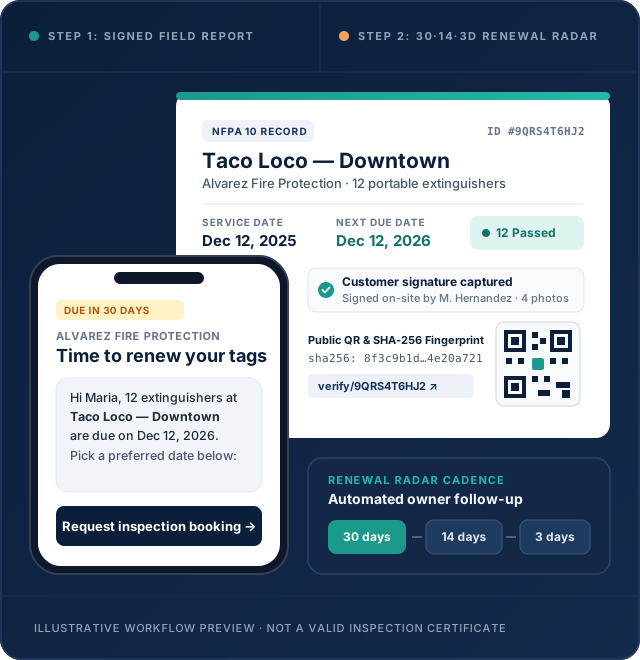
Connect the site, equipment, findings, photos, and customer signature. Review the next due date before finishing.
Renewal Radar schedules email reminders 30, 14, and 3 days before the recorded due date. Pro adds SMS when enabled.
The owner follows a link to request the next visit. Your team confirms the appointment and keeps the relationship.
Illustrative math: a $250 renewal covers three $79 monthly subscriptions before your labor and service costs. Results depend on your business.
Field reports
Bring the equipment list, findings, before-and-after photos, and customer signature into one record. Keep local drafts when the connection drops; reconnect to sync and generate the PDF.
Designed around portable extinguisher and commercial kitchen exhaust work. Your technician reviews the result and service interval.
A record you can find
A QR code opens a public verification record. A SHA-256 fingerprint provides a way to check a PDF against the original. Your required physical service tags stay in place.
It is a practical record of the work—not an NFPA certification or an AHJ approval.
The right fit
Start with up to 2 technicians on Starter or 5 on Pro. Keep portable extinguishers and kitchen exhaust visits in the same workflow.
Need sprinkler or alarm ITM, backflow, dispatch, payroll, or automatic TCE filing? Those workflows are outside this release.
Two trades, one workflow
Fire extinguisher inspection software for NFPA 10 visits and hood cleaning software for kitchen exhaust work share one customer list, one report format, and one renewal radar. Check the state reporting guides and software comparisons before you switch.
Annual, 6-year, and hydro test checklists with unit-by-unit pass/fail tracking, deficiency notes, and automatic next-due calculation.
Explore extinguisher workflow →Monthly, quarterly, semi-annual, and annual hood cleaning intervals with required before-and-after photo evidence and signed certificates.
Explore hood cleaning workflow →Your shop. Your customers.
No per-equipment fee. 14 days free. No credit card required to start.
Up to 2 technicians
$79 / month
Or $790/year — two months free
Up to 5 technicians
Most popular$129 / month
Or $1,290/year — two months free
USD. Annual subscriptions are billed upfront. SMS requires messaging activation; availability depends on your configuration.
Product specifications
Questions & answers
Straight answers on pricing, offline inspections, QR labels, and third-party compliance portals. Need more detail? Check the full FAQ or contact our team.
No. InspectRenew does not file reports with an AHJ or integrate with TCE. Check the reporting rules for your exact site and service. Where your AHJ accepts a PDF attachment, you can submit your report yourself. If a portal requires its own form, that work still needs to be completed there.
No. The QR label is a convenient link to a verification record. Keep the physical service tag, maintenance labels, and records required by your state, local AHJ, and equipment manufacturer.
The web app is designed for local inspection drafts and retry after reconnection. A local draft is not a completed server record. Synchronization and server-generated PDFs require connectivity; confirm completion before leaving the job.
Renewal Radar uses the recorded due date to schedule reminders 30, 14, and 3 days beforehand. Starter includes email. Pro supports SMS when messaging is enabled. The technician remains responsible for checking that the due date fits the equipment and local requirements.
The initial release focuses on renewal reminders and booking requests. Payment collection on behalf of your shop is not included in this release. A request is not a confirmed appointment until your team accepts it.
No. InspectRenew focuses on portable fire extinguishers and commercial kitchen exhaust cleaning. It does not include sprinkler or alarm ITM, backflow reporting, dispatch, payroll, or QuickBooks integration.
Start with one site
Try the workflow with your own equipment and customer records. 14 days free, no card required.